What is X clipping, and how do you run a clipping campaign with it?
X Clipping lets anyone post 5-60 seconds of a video with credit to the creator. How it works, who gets paid and how to run a clipping campaign on X.
- Written by
- Jack HaldorssonCo-Founder
- Published
- Reading time
- 15 minutes
- Topic
- Social and community

Contents
- 1What is X Clipping?
- 2How to clip a video on X
- 3The rules: which videos can be clipped, and for how long
- 4Who gets paid when a video is clipped
- 5Why native clipping changes clipping campaigns on X
- 6Start with a long video and clippers your buyers follow
- 7Brief the clippers and release the clips in waves
- 8Crypto clips need the Paid Partnership label, and some regions ban them
- 9How to measure a clipping campaign
- 10How Lunar Strategy and Creator Wire approach clipping on X
- 11FAQ
X announced Clipping on November 9, 2026, and the @XCreators post passed 1.7 million views by the next day. The feature does one thing: it lets anyone post a short moment from someone else's video, natively, with credit and a link back to the source. For creators that means more reach. For brands, it changes how a paid clipping campaign works and what it can return.
Clipping campaigns were already one of the fastest-growing creator formats of 2026: US Google searches for "clipping campaign" went from about 210 a month in October 2025 to 1,300 in September 2026, according to Google Ads data. On X, they had a flaw. Clips were downloaded and uploaded again as new videos, so the views stayed on the clipper's account and nothing pointed back to the project that paid for them. Native clipping fixes that: every clip now credits and links to your original video, so a paid clip can bring followers and sign-ups to your own account.
This guide is for founders, marketing leads and growth teams who post video on X. It covers how the feature works, the rules, who gets paid, and how to run a clipping campaign around it, from the source video to the numbers you should track. We start with what the feature is.
What is X Clipping?
X Clipping is a native feature that lets you select a 5 to 60 second moment from someone else's video on X and post it with your own commentary, without leaving the app. Every clip shows a "Clip from" label that links to the original video, and both the clipper and the original creator can earn from the clip's views.
Before Clipping, sharing a moment from a long video on X meant downloading the file, trimming it in an outside editor like CapCut and uploading it as a new video, with no credit or link for the original creator. X's creator team described the problem at launch:
"Until now, clipping on X meant downloading videos, editing them using outside tools, and reuploading. Original creators often didn't get credit, and even when a clip went viral, they didn't earn from it."
Allegra Jacchia, Creator Product at X, on X, November 2026
The fix works on both sides. Clippers get a few-tap way to share a moment, and the creator gets a credited link from every clip of their video. For a brand, the second half is what matters: a clip of your founder's talk is now an ad for the full talk.
How to clip a video on X
Clipping lives inside the Repost menu of the X app. It works on iOS and Android today, and X says web is coming soon. If you don't see the option, update the app and check that the video is pre-recorded and at least 2 minutes long.
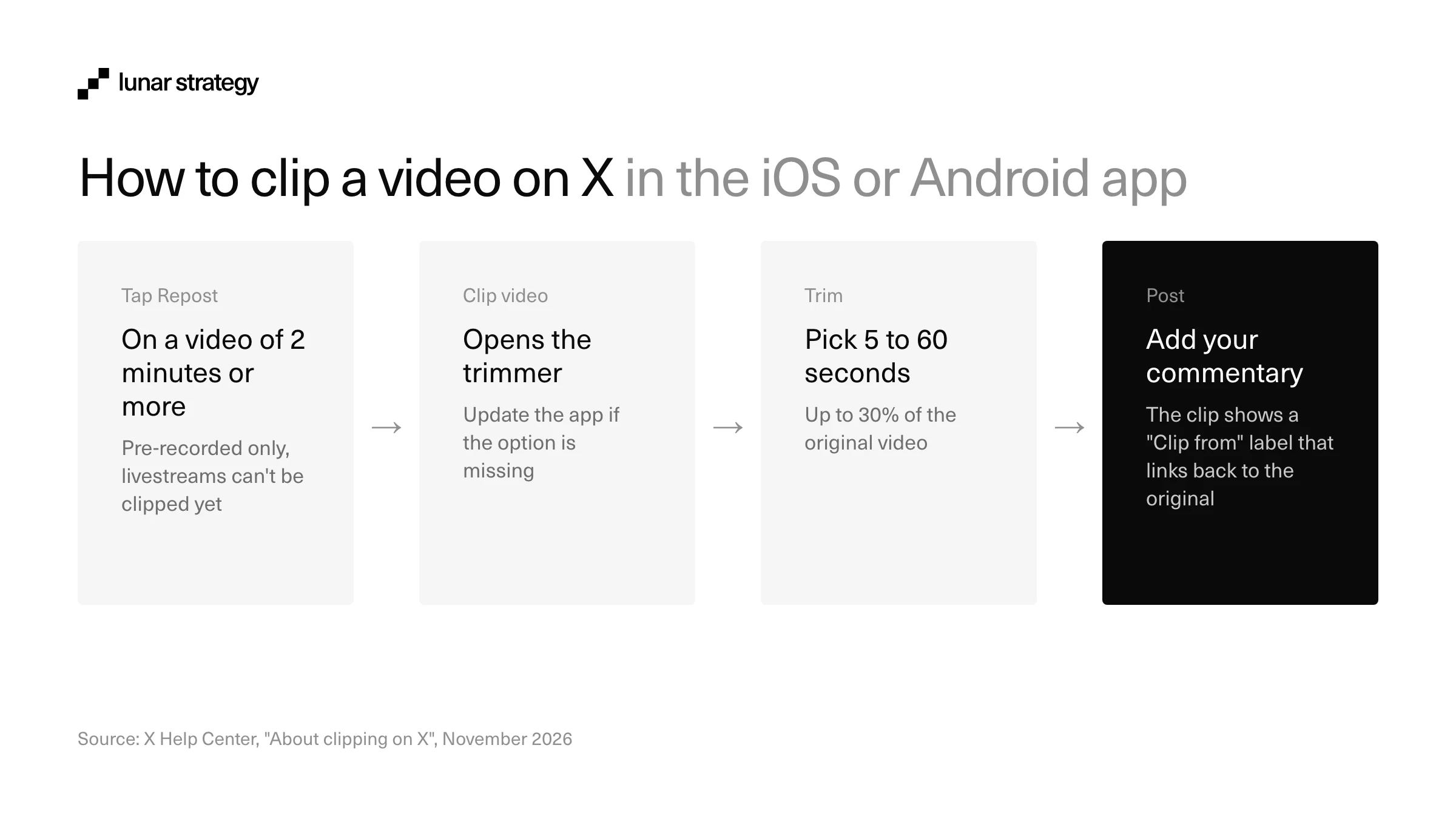
- Open a video of 2 minutes or more and tap the Repost icon.
- Tap Clip video.
- Drag the handles on the trimmer to pick your moment, between 5 and 60 seconds.
- Tap Next to add the clip to your post.
- Write your commentary and tap Post.
Viewers watch the clip in their timeline like any other video. When they tap the "Clip from" label, the original video opens at the exact moment the clip starts, with a timestamp such as 1:14 / 25:00 that shows where the clip sits.
For a brand, this is the useful part: the viewer lands inside your full video, already watching, one tap from your profile.
The rules: which videos can be clipped, and for how long
X set a few hard limits on what can be clipped. They decide which of your videos can feed a campaign, so plan your content around them before you brief anyone. Here are the rules from X's Help Center, checked on November 10, 2026:
| Rule | What it means for a campaign |
|---|---|
| Only pre-recorded videos of 2 minutes or more can be clipped | Short promo videos can't feed a clipping campaign. Post the long version natively |
| Clips run from 5 to 60 seconds | Plan moments of 20-60 seconds that make sense on their own |
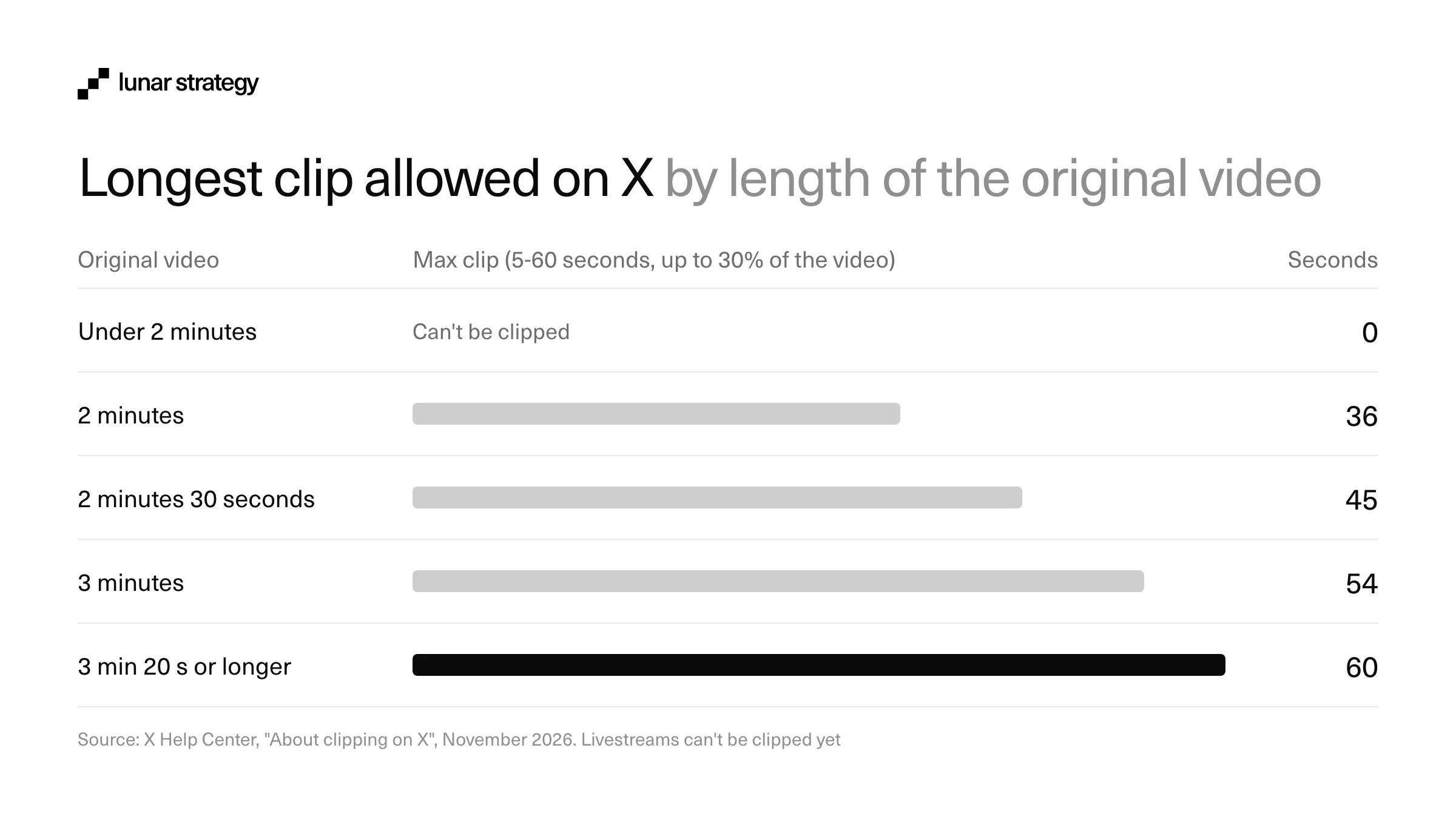
| A clip can be up to 30% of the original | A 2-minute video allows clips of 36 seconds at most. Videos over 3 minutes 20 seconds allow the full 60 |
| Livestreams can't be clipped yet | Upload the recording of a Space, AMA or stream as a video after it ends |
| You can't turn off clipping on your videos | Anyone can clip your video, including critics. X says an opt-out is in the works |
| Deleting the original removes every clip of it | Never delete or re-upload a source video while a campaign is running |
| Available on iOS and Android only | Clippers need the latest app; web support is coming |
The 30% cap and the delete rule shape most campaigns. The cap means a 10-minute founder interview can be cut into dozens of distinct clips, while a 2-minute teaser gives clippers very little to work with. And because a deleted original takes every clip down with it, fixing a typo by re-uploading the source video will wipe out the whole campaign's distribution.
Who gets paid when a video is clipped
Both the clipper and the original creator can earn from a clip, as long as each one is enrolled in Original Content Rewards, the program that replaced X's Creator Revenue Sharing in 2026. The clipper earns from engagement on the clip the same way they earn from their other posts. The original creator earns from clips of their video, calculated the same way as earnings from embedded reposts of their content, according to X's clipping rules.
Getting into the program takes more than a big account. X's eligibility rules require all of the following:
- An active X Premium, Premium+ or Premium Business subscription.
- At least 500 verified followers.
- At least 500,000 Home timeline impressions from verified users in the last 90 days, not counting replies.
- An account in good standing, run by someone 18 or older, in one of the countries where the program is available.
Payouts arrive every two weeks, with a $30 minimum, and only "qualified impressions" count: unique views from Premium users on the Home timeline where at least half of the post is visible. X has not published a rate per view.
For a brand, the takeaway is practical. Original Content Rewards is a bonus for the clipper, never a reason to pay them less. You can't predict what a clip will earn, and most small clippers won't qualify. The same program also explains why the old way stopped paying: content "downloaded from X or other platforms and then reuploaded" is excluded from qualified impressions, so a downloaded clip now earns its creator nothing.
Why native clipping changes clipping campaigns on X
A clipping campaign is a paid push where a brand hires many creators (clippers) to post short cuts of its long videos. Until now on X, those campaigns bought views on other people's accounts. Native clipping adds a link from every clip to the brand's original video, which changes what the budget buys.
| Download and re-upload (before) | Native Clipping (since November 9, 2026) | |
|---|---|---|
| Credit | None, the clip looks like the clipper's own video | "Clip from" label on every clip |
| Link back | None | Opens your original video at the clipped moment |
| Where views end up | On the clipper's account only | On the clip, plus viewers who continue on your post and profile |
| Creator payouts | The clip doesn't qualify for Original Content Rewards | Both sides can earn if enrolled |
| Control | Clips live on even if you delete the source | Deleting the source removes every clip |
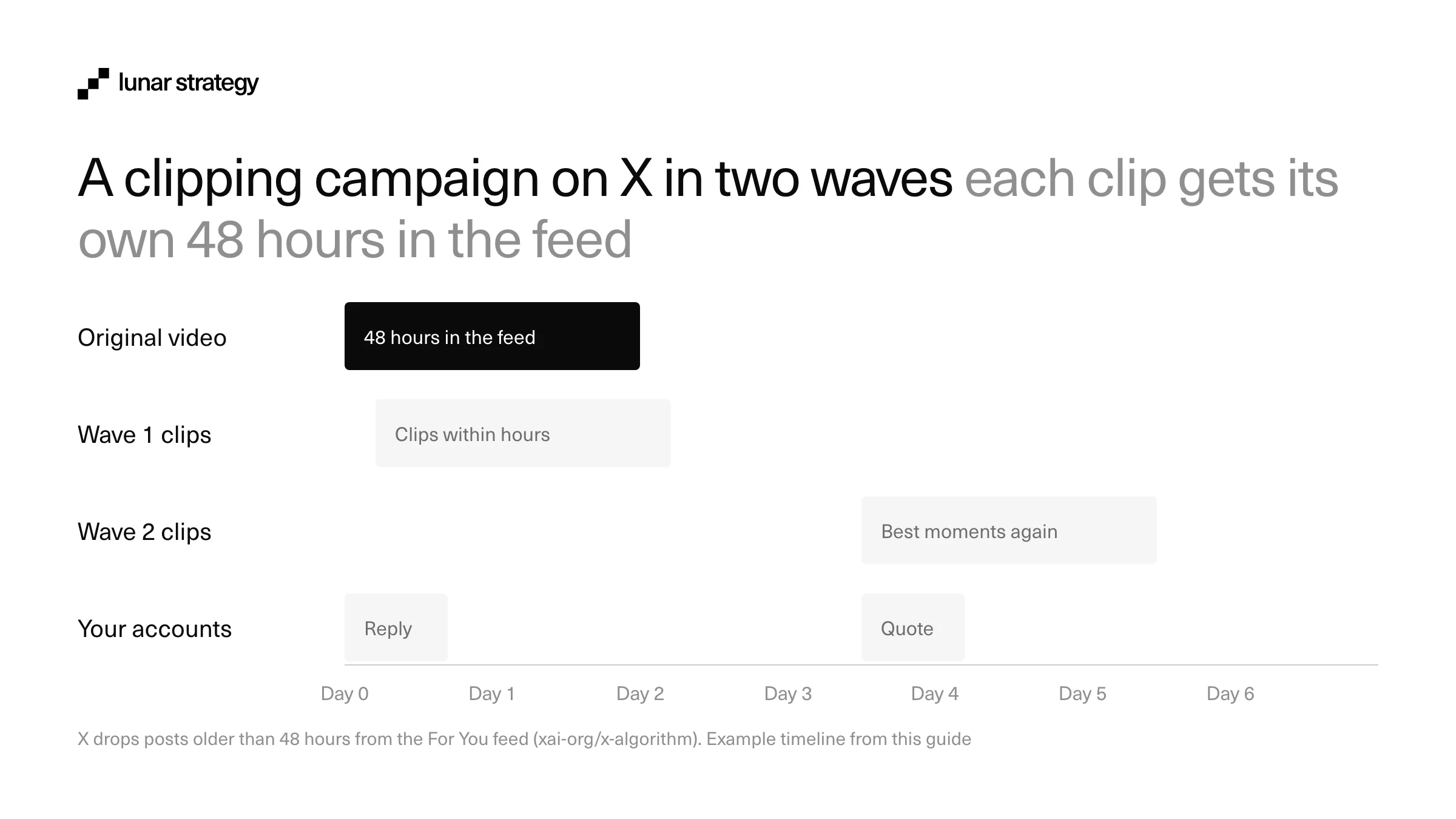
Native clips also buy time. X's algorithm drops any post older than 48 hours from the For You feed, so a launch video has two days to find its audience before it disappears. Each new clip is a fresh post with a fresh 48 hours, and each one points back to the original. A campaign that releases clips over a week keeps sending new viewers to a video that X would otherwise have buried after day two.
Smaller clippers may also get a head start. X's open-source code gives accounts with up to 50,000 followers a test slot for a new original post in its first 2 hours. The code doesn't yet show whether a clip counts as an original post, but if it does, ten mid-size clippers get ten early tests where one large account gets none. We explain how that test and the other ranking rules work in our guide to how the X algorithm works.
Start with a long video and clippers your buyers follow
The source video decides how many good clips exist. The best ones for a crypto project are founder talks, product demos, podcast episodes, AMAs and webinars, uploaded natively to X and running well past 2 minutes. A 20-minute interview gives clippers room for many 60-second moments. Our founder X playbook covers how founders can make these talks a habit. Before you post, write down 5 to 10 timestamps where a point lands on its own: a clear claim, a number, a strong opinion or a short demo of the product working.
Jack Haldorsson of Lunar Strategy posted the short version of this playbook the day after launch:
X just introduced Native Clipping. How to Run Clipping campaigns on X for your company
Jack Haldorsson (@Jackhaldorsson), November 10, 2026
Livestreams can't be clipped yet, so a Space or a live AMA needs a second step. When it ends, upload the recording as a regular video from the project or founder account, then start the campaign on that upload. Post the video from the account you want to grow, because every "Clip from" link will point there.
Choosing the clippers is where most budgets are won or lost. Pick accounts whose followers are your buyers (traders, DeFi users, developers, depending on the product), and rank them by smart followers, meaning the respected accounts in your niche who follow them, instead of raw follower counts. Before paying anyone, read their last 20 replies: real conversations are a good sign, while walls of "gm" and emoji replies from accounts with no history point to bought engagement. Check for past spam or deleted promo posts too.
Spread the budget across many niche accounts instead of one large one. Ten clippers with 10,000 to 50,000 engaged followers each reach more distinct people than one account with 500,000, they can qualify for X's early test for smaller accounts, and their audiences overlap less. This is the same logic we used for MultiversX, where 2-3 tier-1 creators posted original content and smaller accounts quoted and reposted it, a mix that reached 276,194 impressions for the announcement.
Brief the clippers and release the clips in waves
A clipping brief can be short, but four things have to be in it, or clippers will guess. Our KOL brief template covers longer creator briefs; for clips, this is enough:
- The video link and timestamps: the native X post to clip, with the 5-10 moments you suggest. Ask clippers to use Repost, then Clip video, and never to download and upload the file.
- One point per clip: the single message each clip should land, such as "the product does X in 30 seconds" or "here is why the team built it".
- What not to claim: no price talk, no returns, no "guaranteed" anything, and nothing your legal team hasn't approved. In crypto, this line protects the clipper and the project.
- The disclosure: every paid clip turns on X's Paid Partnership label (more on that below).
Leave the commentary to each clipper. If 15 accounts post the same moment with the same caption within an hour, the clips look coordinated and readers who follow several of those accounts scroll past the repeats. Different moments, written in each clipper's own voice, reach more people and start more replies.
Then release the clips in waves. The original goes live first from your account. The first wave of clips follows within a few hours, while the original is still fresh. A second wave comes a few days later on the moments that worked best, which you can tell from the first wave's replies and quotes. Each wave restarts the 48-hour window and sends new viewers to the original.
In every wave, quote the best clips from the project and founder accounts, and reply to comments in the first hours, when X is testing each post. In X's ranking code, a reply is weighted 5 and a copied link 20, against 0.708 for a like, so a clip that starts a conversation or gets pasted into group chats does far more than one that collects likes.
Crypto clips need the Paid Partnership label, and some regions ban them
Any clip you pay for is a paid partnership under X's Paid Partnerships Policy, which covers cash or in-kind payment, gifted products, commissions and ambassador deals. The clipper has to turn on the "Paid Partnership" disclosure in the Content Disclosure settings when posting, and X labels the post automatically. The policy also requires the product or call to action to be clear in the post itself, without making people click a link.
The same policy lists industries that can't be promoted through paid partnerships, and crypto is on the list in some regions:
| Region | Crypto in paid partnerships |
|---|---|
| European Union | Not allowed (financial products, services or opportunities, including crypto) |
| Australia | Not allowed (same financial category) |
| United Kingdom | Allowed with the disclosures UK rules require for commercial content |
| Rest of the world | Allowed under the general rules, with the Paid Partnership label on |
For a crypto project, this shapes the clipper list. X doesn't allow paid promotion of a token or other financial product in the EU or Australia, even with the label on, so check where your clippers and their audiences are based before you pay them. Local advertising rules (such as the FTC's endorsement guides in the US) still apply on top of X's policy, and a Community Note on a clip also makes it ineligible for Original Content Rewards. Disclosure is the cheapest insurance in the whole campaign.
How to measure a clipping campaign
Views are the easiest number to report and the least useful one. Clipping on X sends viewers to your original video and profile, so measure whether they arrived and stayed. Give each clipper a tracked link in their commentary or bio for the duration of the campaign, and compare these numbers per clipper and per wave:
| Metric | Why it matters |
|---|---|
| Views and replies per clip | Shows which moments and which clippers start a conversation, the signal X weighs most |
| Quotes and copied links | The two reactions X weighs above everything else; they predict a clip's second life |
| Views on the original video during each wave | Shows how many people followed the "Clip from" link back to your post |
| Profile visits and new follows on your account | The main gain native clipping adds over the old download model |
| Sign-ups or wallet connections per clipper | The business result, measured through each clipper's tracked link |
| Cost per follow and cost per sign-up | The number that decides who gets budget in the next wave |
After each wave, move the next wave's budget to the clippers who brought follows and sign-ups, and drop the ones who only brought views. Tracking a campaign all the way to the business number is what made our Polkadot creator wave measurable: 40 creators and 208 posts over 60 days in 2024, tracked from the posts to Hydration's TVL, which went from $27 million to $54 million.
How Lunar Strategy and Creator Wire approach clipping on X
Clipping campaigns fit inside our influencer and KOL marketing service. After working with more than 300 crypto projects, we run the creator side through Creator Wire, the creator platform we built at Lunar to reward creators for campaign work. Teams use it to shortlist creators by niche and audience quality, approve each one against a live budget, track impressions and CPM per creator, and pay everyone in one onchain payment.
Clipping fits the same model. A creator who clips a campaign video on X can earn from the clip through Original Content Rewards, if they are enrolled, and still earn their campaign reward through Creator Wire. That gives Creator Wire a new lever: it can reward creators for using native clipping, so every clip carries the "Clip from" link back to the project and works with the way X ranks posts. Campaigns get more reach back to the original video, and creators can earn from X and from the campaign for the same clip.
Our cost guide explains what a crypto KOL campaign costs if you are setting a budget.
Plan a clipping campaign with Lunar →
Tell us about your next video, and we'll map the creators, the brief and the waves with your team.
FAQ
Do you need X Premium to clip a video?
No. Anyone with the latest X app on iOS or Android can clip an eligible video, with or without a subscription. Premium matters only for earning: to get paid for clips through Original Content Rewards, the clipper and the original creator both need an active Premium, Premium+ or Premium Business subscription and must meet the program's follower and impression thresholds.
Can I stop people from clipping my videos?
Not yet. X's Help Center says you can't turn off clipping for your videos today and that the company is working on an option to do so. Until then, any eligible video you post (pre-recorded and at least 2 minutes long) can be clipped by anyone, and every clip will link back to it with a "Clip from" label.
What happens to clips if I delete the original video?
They disappear. When the original video is deleted, X removes every clip of it as well. For brands, that makes the source video the single point of failure in a campaign: keep it live for as long as the clips should circulate, and correct mistakes in a reply or a follow-up post instead of deleting and posting the video again.
Can you clip videos on the X website?
Not at launch. On November 10, 2026, Clipping was available only in the X app on iOS and Android, and X's Help Center says web support is coming soon. Clips still play for people watching on desktop, so viewers on x.com can watch them and open the original video through the "Clip from" label.
Is X Clipping the same as a clipping campaign?
No. X Clipping is the feature: the tool that cuts a moment from a video and posts it with credit. A clipping campaign is a marketing tactic: a brand pays many creators to post clips of its videos to reach new audiences. The campaign existed before the feature, on TikTok, YouTube Shorts and X; our guide on the clipping trend explains how it started.
Tim, Jack or Luka


Free strategy call
20 min
Whether you need help with GTM or other marketing, we give you a first strategy and advice on a free 20-minute call.
Book a callRated 4.9/5 on Clutch