What is Google AI mode, and what does it change for crypto projects?
Google AI Mode is Google's chat-style AI search. How it works, how it differs from AI Overviews, where it's available and what crypto projects should do.
- Written by
- Pedro Freitas
- Published
- Recently updated
- Reading time
- 13 minutes
- Topic
- AI search and SEO

Contents
- 1What Google AI Mode is
- 2How AI Mode works
- 3How to access and use AI Mode
- 4AI Mode vs AI Overviews
- 5What AI Mode changes for traffic and visibility
- 6What crypto projects should do about AI Mode
- 7How to measure your visibility in AI Mode
- 8Where to start
- 9How Lunar Strategy approaches AI Mode
- 10Frequently Asked Questions
In May 2026, Google said AI Mode had passed one billion monthly users, with queries more than doubling every quarter since its launch a year earlier. By October 2026, questions typed into AI Mode were on average three times longer than a traditional search, and one in five AI Mode searches used voice, images or documents. People now ask Google the full question, and they read a written answer before they decide what to click.
For crypto projects, that changes who answers the questions that matter most: is it safe, how does it compare, what does it cost. To show up in AI Mode, a project needs the basics Google has always asked for, clear answers to long questions on its own site, and the same facts on every other site that talks about it.
This guide is for founders, marketers and growth teams in crypto and Web3. It explains what AI Mode is, how it works, how it differs from AI Overviews, who can use which features, what it changes for traffic and what to do about it this quarter.
What Google AI Mode is
A conversational search experience inside Google Search. You ask a question in your own words, by text, voice, photo or file, and AI Mode runs many related searches, reads the results and writes one answer with links to the pages it used. You can then ask follow-up questions in the same conversation, and it keeps the context.
Google's help page calls AI Mode its most powerful AI search experience. Its documentation for site owners says AI Mode is most useful for questions that need more exploring, reasoning or comparing.
A regular search handles "ETH price" well. AI Mode is built for "which layer 2 has the lowest fees for small swaps, and what are the risks of each?", the kind of question that used to mean opening ten tabs.
AI Mode went from a small test to a global product in about a year:
| Date | What happened |
|---|---|
| March 2025 | Google introduced AI Mode as an opt-in experiment in Search Labs, first for Google One AI Premium subscribers |
| May 2025 | It rolled out to everyone in the US, with no Labs sign-up needed |
| August 2025 | It expanded in English to more than 180 new countries and territories |
| October 2025 | It added more than 35 languages and over 40 countries, reaching more than 200 countries and territories |
| May 2026 | Gemini 3.5 Flash became the default model, and a new AI Search box started rolling out |
| October 2026 | Google added more inline links to websites and started scaling ads in AI Mode to 10 more countries |
| November 2026 | Gemini 4 Hydrogen became the model behind AI Mode for all users |
Google now runs AI Overviews and AI Mode as one flow. You can ask a follow-up question right from an AI Overview and continue the conversation in AI Mode, which Google says has been live on desktop and mobile worldwide since May 2026. For most people, AI Mode is now where a search goes when the first answer isn't enough.
How AI Mode works
When you ask AI Mode a question, it does not run just one search. It breaks your question into smaller questions and searches for each one at the same time, on the web and in Google's own data. Then it reads what it found, writes one answer and adds links to the pages it used. Google calls this method query fan-out, because one question "fans out" into many searches. If AI Mode is not sure enough to write an answer, Google's help page says it shows a list of web links instead.
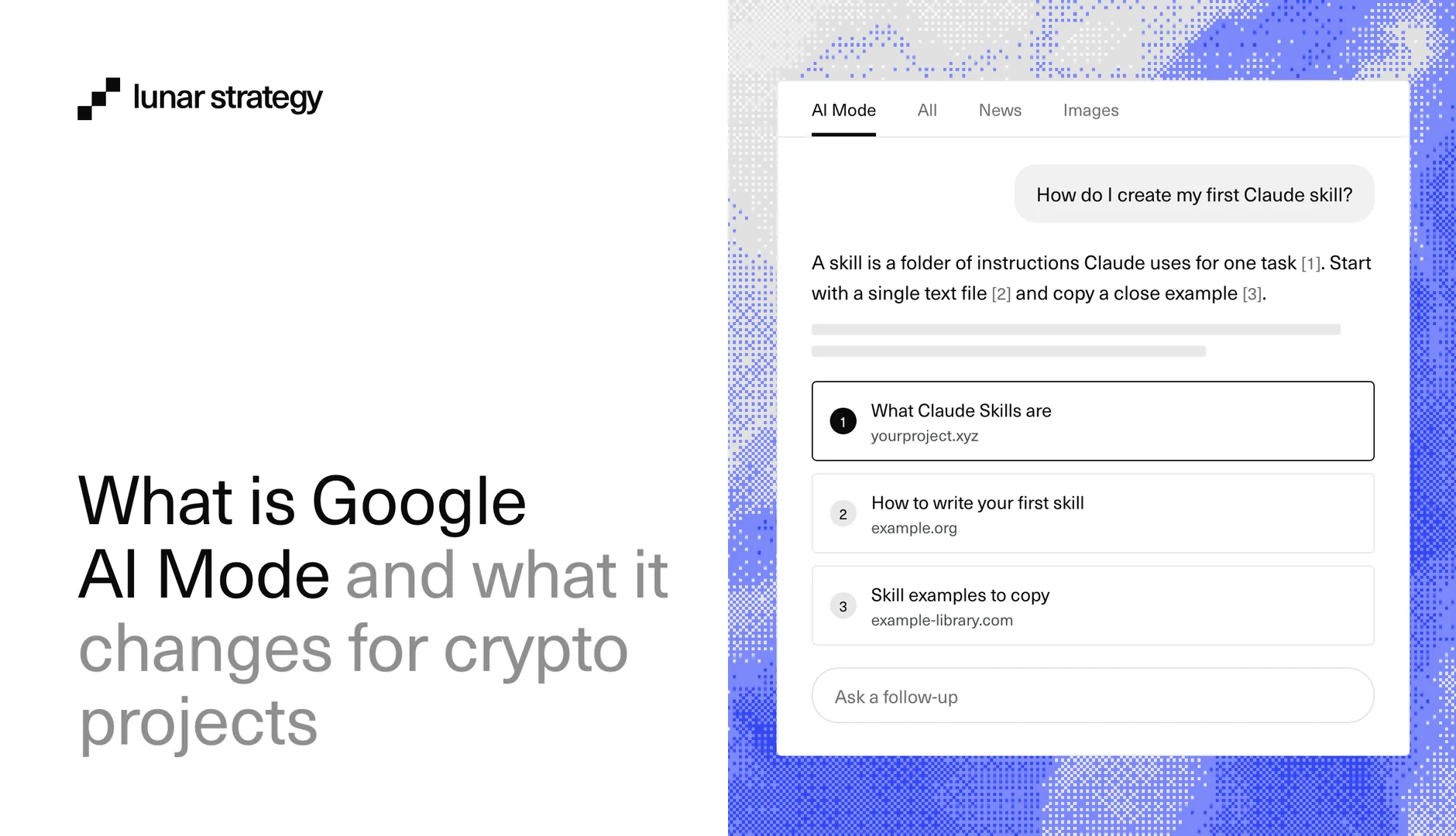
Here is an example. Say you ask: "How do I create my first Claude skill?" Claude is an AI assistant, and a skill is a set of instructions it can follow. Google does not share the exact searches it runs, but they could look like this:
- Basics: what a Claude skill is and what it can do
- Setup: how to write a skill, step by step
- Examples: ready-made skills you can copy and change
- Tips: common mistakes, and what people say on forums and in videos
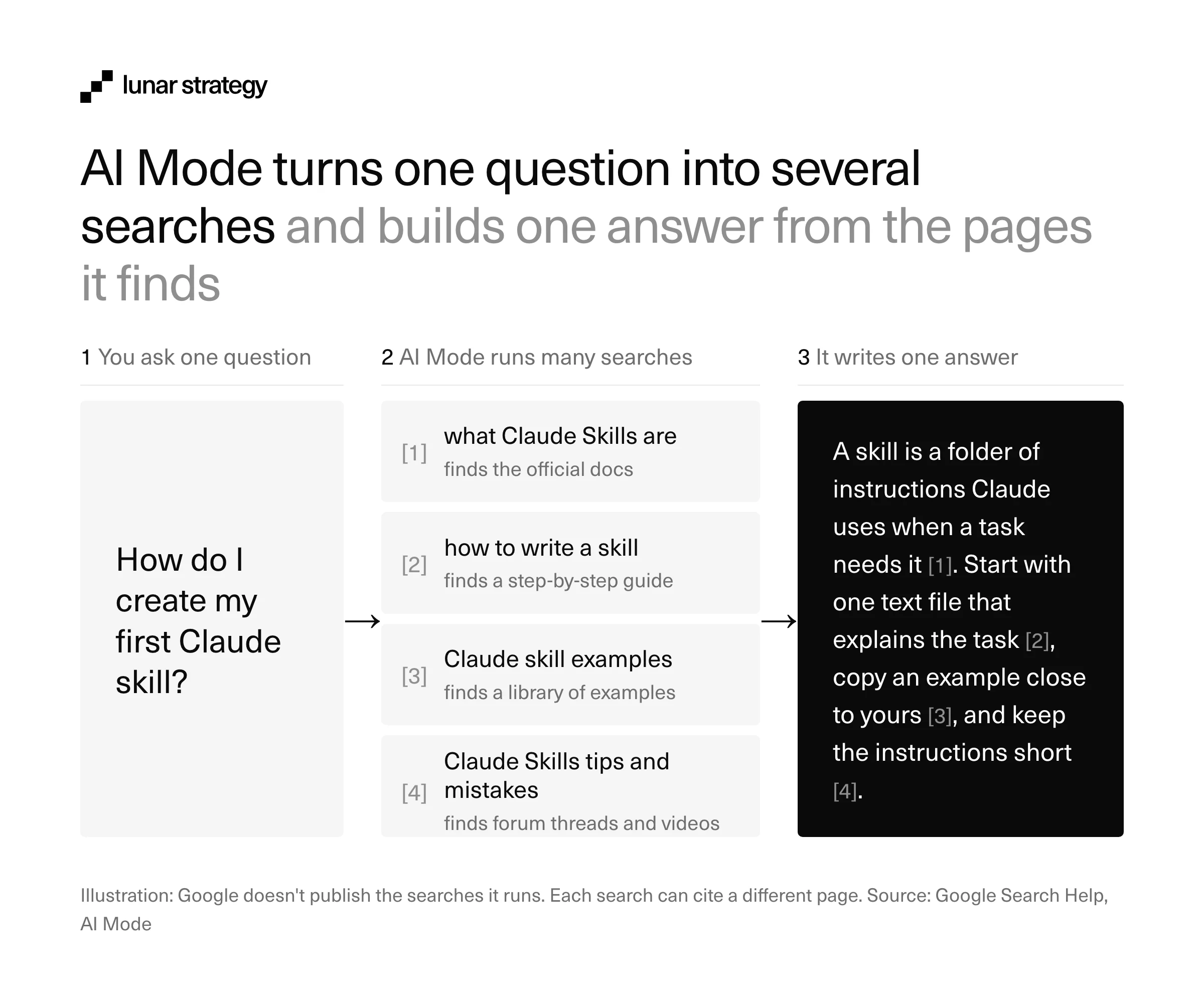
Each search can find a different page. So one answer can link to Anthropic's own guide for the basics (Anthropic is the company that makes Claude), a how-to article for the setup and a forum post for the tips. This is the key point for anyone with a website: your page can be a source for one part of a question, even if it does not rank for the whole question. Our guide to answer engine optimization (AEO) shows how to write pages that answer one part clearly.
The answers are written by Gemini, Google's family of AI models. On November 12, 2026, Google moved Search to a new model, Gemini 4 Hydrogen, for every user in the world. Google calls it the biggest model upgrade to Search so far, and says it makes fan-out better and links to a wider range of websites. People who pay for a Google AI plan can also choose stronger models for harder questions.
For long research, there is Deep Search. It can run hundreds of searches and write a full report, with a source for each point, in a few minutes. Google launched it in July 2025 for people in the US who pay for Google AI Pro or AI Ultra.
How to access and use AI Mode
There are three ways to open AI Mode: type a question on google.com and pick AI Mode, go straight to google.com/ai, or use the Google app. You can also get there from an AI Overview, the short AI summary at the top of some search results, by asking a follow-up question under it. Since May 2026, Google has also been rolling out a new AI Search box. You can type in it or add images, files, videos or open Chrome tabs, and it is coming to every country and language where AI Mode works.
Using AI Mode is free. Some extra features need a paid Google AI plan, a personal Google account or a location in the US, and Google adds new ones often. This is what was available in November 2026:
| Feature | What it does | Who can use it |
|---|---|---|
| AI Mode | Writes answers with links, and lets you ask follow-up questions | Free, everywhere AI Mode is offered |
| Search Live | You talk to Search out loud, or point your phone camera at something and ask about it | Every language and location where AI Mode is offered (March 2026) |
| Deep Search | Runs hundreds of searches and turns them into a report with sources | Google AI Pro and AI Ultra subscribers |
| Personal Intelligence | Uses your Gmail, Google Photos and past searches to give answers that fit you | Nearly 200 countries and territories, 98 languages, free (from May 2026) |
| Agentic booking | Finds options for you, then sends you to the provider's site to finish the booking ("agentic" means the AI does some of the steps for you) | Announced for everyone in the US from summer 2026 |
| Information agents | Follow a topic for you and send you updates when something changes | Google AI Pro and AI Ultra subscribers first (announced May 2026) |
Personal Intelligence stays off until you turn it on. Google's help page says you choose whether to connect Gmail, Calendar and Google Photos, and you can disconnect them at any time. It is only for users aged 18 or older. For a crypto team, this means two people who ask the same question can now get different answers, because one of them has shared more about themselves with Google.
AI Mode vs AI Overviews
AI Overviews are short summaries that appear above the regular results on many searches. AI Mode is a separate, longer conversation that you enter on purpose or through a follow-up question. Google says the two may use different models and techniques, so the answers and links they show will vary.
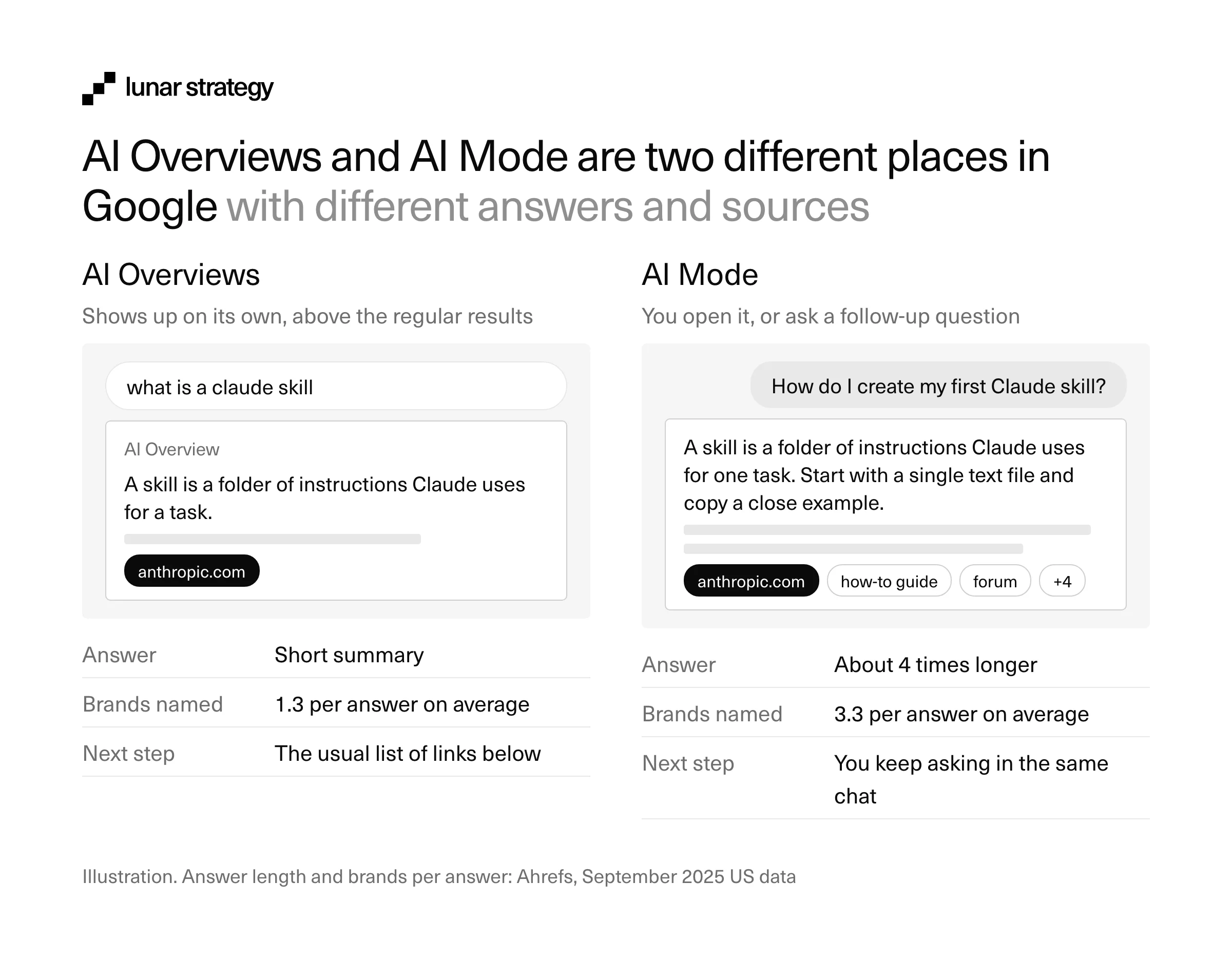
Ahrefs measured how much they vary. In a study published in December 2025, it compared 730,000 pairs of answers from September 2025 US searches and checked the citations in 540,000 of them (Ahrefs). The two answers meant almost the same thing (Ahrefs scored them 86% similar in meaning), but they cited the same URLs only 13.7% of the time:
| AI Overviews | AI Mode | |
|---|---|---|
| Where it appears | Above the regular results | In its own conversation, opened by the user or by a follow-up |
| Best for | Getting the main point of a topic fast | Exploring, reasoning and comparing options |
| Answer length | Short | About 4 times longer |
| Brands and people named per answer | 1.3 on average | 3.3 on average |
| Share of citations from Wikipedia | 18.1% | 28.9% |
| Other source patterns | YouTube was the most cited domain | Quora was cited 3.5 times more often |
| How a page qualifies | Indexed and eligible for a snippet | Same rules, with no extra requirements |
Answer and citation figures: Ahrefs, September 2025 US data. Eligibility rules: Google Search Central.
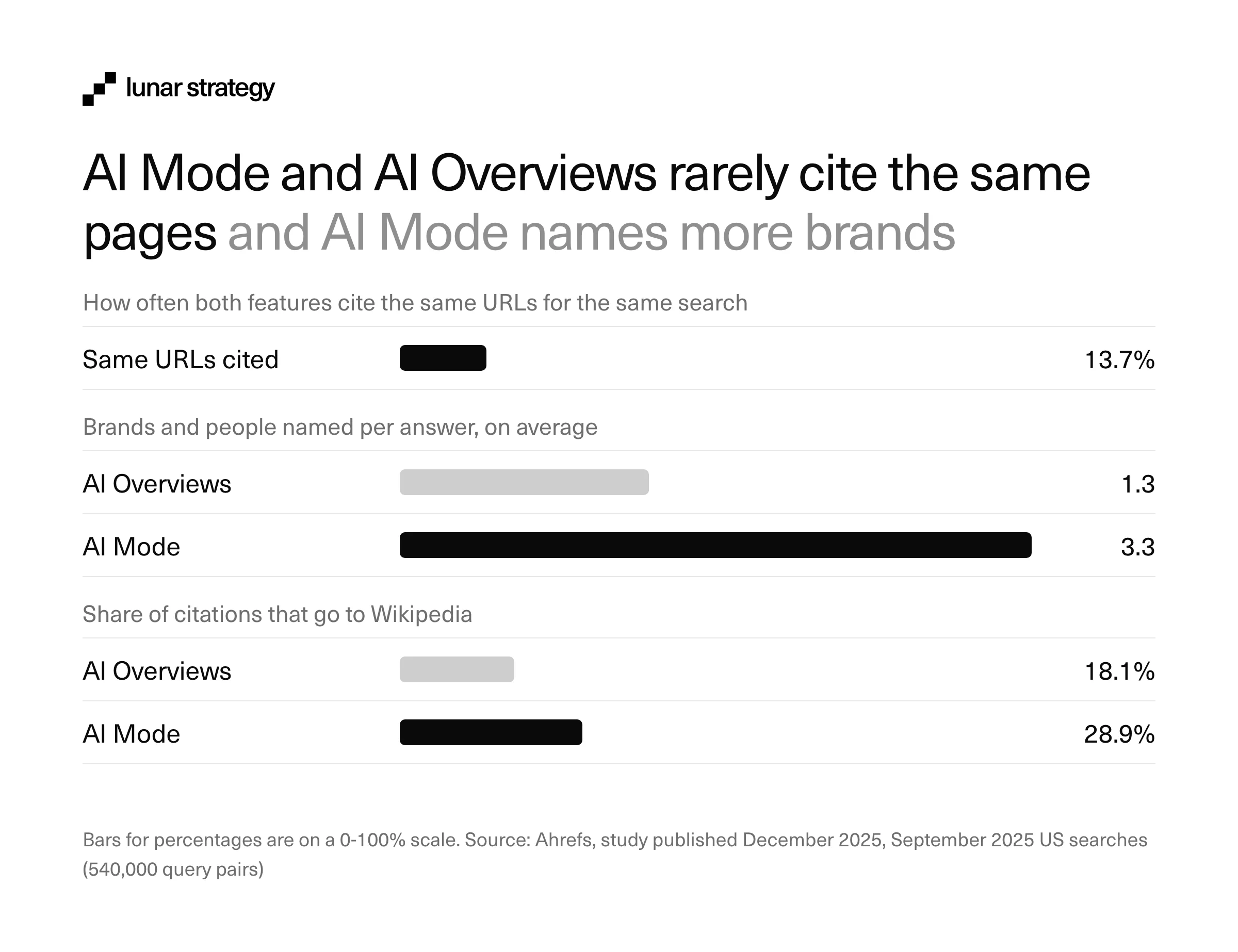
The page rules are the same, so the work to qualify is the same. The sources are different, so a citation in one tells you little about the other. AI Mode leans more on Wikipedia and Quora, and it names more than twice as many brands in each answer. That gives a crypto project more chances to be named, and more chances to be described by someone else. If AI Overviews are your first priority, our guide to ranking in Google AI Overviews covers that feature step by step.
What AI Mode changes for traffic and visibility
Google says AI search still sends useful visitors to websites. In July 2026, Sundar Pichai, the CEO of Google, said that AI Mode and AI Overviews are leading to more searches on Google overall (Google):
"we're now sending billions of clicks to websites every week through AI features in Search"
Sundar Pichai, CEO, Google and Alphabet
When one answer covers the whole question, people only click when they want more detail, proof or the next step. So the clicks go to the pages that answer one small part of the question best. In October 2026, Google said it had added many more links inside its AI answers, and that it is testing a section with official websites at the top of some answers. This matters in crypto, where scammers build fake copies of real projects: a clear official website helps AI Mode link to the real one.
Three more changes matter for crypto teams:
- Longer questions: people type the full question into AI Mode, such as "Is this project safe?" or "Which is better, X or Y?". A project's own pages rarely answer questions like these directly.
- Other websites as sources: AI Mode uses Wikipedia and Quora (a question-and-answer website) as sources more often than AI Overviews do. So what other websites say about your project has a real effect on the answer.
- Ads inside answers: in October 2026, Google started bringing ads in AI Mode to Australia, Canada, India, Kenya, Malaysia, New Zealand, Nigeria, Pakistan, the Philippines and Singapore. Brazil, Mexico and the UK were planned for the last three months of 2026. In the US, Google added ads to follow-up questions, marked "Sponsored".
Crypto projects have fewer ways to advertise in AI Mode than other businesses. Under Google's cryptocurrency ads policy, crypto exchanges and software wallets (wallet apps) can only run ads after Google approves them, and the rules are different in each country. Some crypto ads are banned in every country, such as ads for buying or trading crypto. So for most projects, being part of the normal answer is the main way to show up in AI Mode.
What crypto projects should do about AI Mode
Start with eligibility, because nothing else works without it. Google says a page must be indexed and eligible to show a snippet to appear in AI Mode, and that there are no additional requirements. In practice, check three things: that robots.txt and your CDN or hosting settings let Googlebot crawl the site, that no nosnippet or very short max-snippet rule ships in a docs or CMS template, and that Search Console's setting for generative AI features still includes your site, which is the default.
On the crypto sites we audit, bot protection at the CDN level is one of the first things we check, because it can block Googlebot without anyone on the team noticing. Docs hosted on a separate subdomain and audit reports saved as PDFs need the same check, since they are often the pages that answer the safety part of a question.
Next, write for the long questions people now ask. AI Mode does its best work on questions with several parts, and fan-out means it looks for the page that answers each part most clearly. Put the answer in the first two sentences of a page or section, use the words people use, date your numbers and keep the main content as text, with images and video in support. Google's guide to AI features in Search says you can ignore tactics such as splitting content into chunks, adding AI text files like llms.txt or chasing fake mentions.
Then make your facts agree everywhere. AI Mode reads your docs, but it also reads data sites, exchange pages, wikis and forums, and when they disagree on supply, fees or audit status, the answer can repeat the wrong number. Keep one official domain, link to it from your X profile, docs and listings, and fix outdated facts on other sites when you find them. Our guide to generative engine optimization (GEO) covers the off-site side in more depth.
The questions that decide whether someone trusts a crypto project fall into a few types. This worksheet shows what each answer needs from you:
| Question type | Example | What the answer needs from your site |
|---|---|---|
| Safety | "Is [protocol] safe to use?" | An audits page with reports, dates, findings and fixes, plus your bug bounty and any past incidents |
| Comparison | "[Project] vs [rival] for staking" | A fair comparison page with fees, supported chains, lock-up periods and risks |
| How-to | "How do I bridge to [chain]?" | A step-by-step guide with screenshots and the expected costs |
| Cost | "What are the fees on [DEX]?" | A fees page with current numbers and a "last checked" date |
| Legitimacy | "Is [token] legit?" | Team, investors, listings and official links on one page |
How to measure your visibility in AI Mode
Google counts AI Mode traffic inside your regular Search Console data, and since June 2026 Search Console also has a generative AI report that shows how often your pages appear in AI Overviews and AI Mode. It reached every site on August 31, 2026. It shows impressions by page, country, device and date, but not clicks or the questions that triggered them, so you still need to check the answers yourself.
| Metric | Why it matters | How to check |
|---|---|---|
| Impressions in AI features | Shows which pages Google uses in AI answers | Search Console generative AI report |
| Clicks from Search | AI Mode clicks are counted in your total Search clicks | Search Console Performance report |
| Citations for key questions | Shows whether you are one of the linked sources | Ask AI Mode 20-30 fixed questions every month and log the cited sites |
| Brand named in answers | Being named is the first step to being chosen | The same monthly log |
| Branded searches | Shows people searching for you after seeing an answer | Queries with your brand name in Search Console |
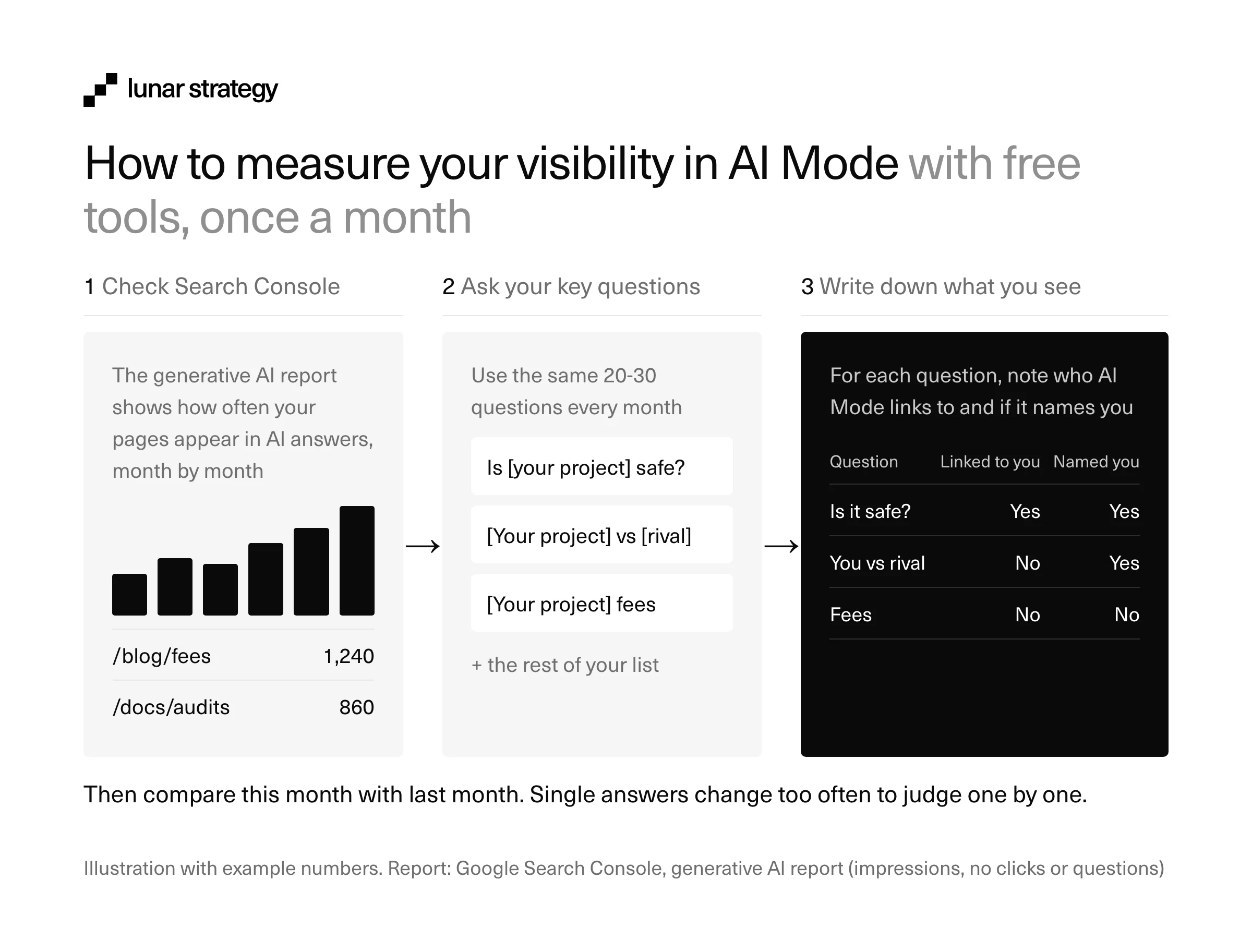
AI answers change from one run to the next. In January 2026, SparkToro and Gumshoe, a company that sells AI tracking, found there was less than a 1 in 100 chance that ChatGPT or Google's AI would give the same list of brands twice (Search Engine Journal). Compare month to month, never one answer to another. When the manual log gets slow, paid trackers can run the questions for you; our review of AI visibility tools compares the options.
Where to start
This quarter, confirm that your key pages are indexed and snippet-eligible, then write down the 20-30 questions your users ask before they trust you and run them in AI Mode to see who gets cited today. Fix the facts on your own site first, build the missing safety, comparison and fee pages next, and finish by correcting what other sites say about you. Repeat the questions every month.
A checklist for the first month:
- Googlebot can crawl the site, docs and audit PDFs, with no CDN block
- No nosnippet or very short max-snippet rules on key pages
- Search Console generative AI report checked, with a baseline saved
- 20-30 user questions logged, with the sites AI Mode cites for each
- One page for each key safety, comparison and fee question, with the answer first
- Token, fee and audit facts identical across docs, data sites and exchanges
If you're new to search, our crypto SEO guide covers the basics that AI Mode is built on.
How Lunar Strategy approaches AI Mode
Our crypto SEO and AI search service runs Google search and AI answers as one program, because Google says the same SEO basics decide both. Each month we optimize up to 10 pages and publish 4 blog posts, and the first wins often come in 4 to 8 weeks. On the AI side, we check that crawlers can read your site, track the questions your users ask AI tools and fix wrong facts about you on the sites those tools repeat.
We've worked with more than 400 crypto teams since 2019. Two results from our service page:
- Web3 security platform: 26% more clicks and 74% more impressions in 3 months.
- Crypto wallet security SaaS: 2.4K+ clicks and 67K+ impressions from two articles in their first year.
Explore our crypto SEO and AI search service →
Or book a call and bring five questions your users ask: we'll show you who AI Mode cites for them today.
Frequently Asked Questions
Is Google AI Mode free?
Yes. AI Mode is free in every country where it's available. Some features cost money: Deep Search and information agents start with Google AI Pro and AI Ultra subscribers, and the most advanced model in AI Mode is limited to AI Ultra subscribers, with daily usage limits. The answers, links and follow-up questions cost nothing.
Is AI Mode the same as Gemini?
No. AI Mode runs on Google's Gemini models, but it lives inside Google Search and builds its answers from search results, with links to the pages it used. The Gemini app is Google's separate AI assistant for chatting, writing and other tasks. They share technology, and they serve different jobs.
Can I turn off AI Mode?
You don't need to. AI Mode only opens when you choose it on google.com, go to google.com/ai, or ask a follow-up question under an AI Overview. Regular searches still show the usual results. AI Overviews work differently: Google shows them automatically on many searches, at the top of the regular results.
Can a website stop AI Mode from using its content?
Yes, with limits. The nosnippet rule keeps a page's text out of AI Mode and AI Overviews, and max-snippet limits how much can be used. Search Console also lets you exclude a site from Google's generative AI features. Both reduce how your pages appear in Search, so most crypto projects are better off allowing them.
Do I need special markup or an llms.txt file to appear in AI Mode?
No. Google says there are no additional requirements beyond being indexed and eligible for a snippet, and that an llms.txt file will neither help nor harm your visibility in its Search. Structured data still helps Google understand a page, as long as it matches the visible text, but no markup makes a page appear in AI Mode.
Why does AI Mode give a different answer each time?
AI Mode writes each answer fresh from the searches it runs, and the results, the model and your personal context can all change between runs. Google's help page also warns that AI answers can contain mistakes. Judge your visibility over several checks a month, and treat a single answer as one sample.
Tim, Jack or Luka



Free strategy call
20 min
Whether you need help with GTM or other marketing, we give you a first strategy and advice on a free 20-minute call.
Book a callRated 4.9/5 on Clutch